
The Document Element
The Document element is the root element at the base of every document entity. Document elements hold the styles applied to the document, as well as the header and footer content.
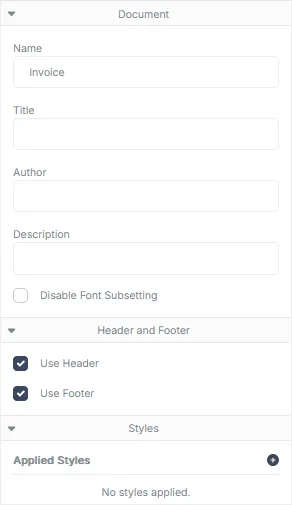
Document Properties
Section titled “Document Properties”| Field | Description |
|---|---|
| Name | The name of the document. |
| Title | The title property of the PDF file that will appear in the file’s meta data. |
| Author | The author property of the PDF file that will appear in the file’s meta data. |
| Description | The description property of the PDF file that will appear in the file’s meta data. |
| Disable Font Subsetting | Prevents the font subsetting operation from running on the final rendered PDF. Font subsetting can reduce the size of a PDF document by removing unused font characters (called glyphs) from the font data embedded within the PDF file. Note: Enabling this property may increase the file size of your rendered PDFs. |
Header and Footer Properties
Section titled “Header and Footer Properties”| Field | Description |
|---|---|
| Use Header | Enables the rendering of the header element for each page in the document. |
| Use Footer | Enabled the rendering of the footer element for each page in the document. |
Style Properties
Section titled “Style Properties”| Field | Description |
|---|---|
| Applied Styles | Displays a list of Styles that have been applied to the document. Click on the blue plus icon to add additional styles to the document. |