
Text Elements
There are several elements available for rendering text within a document, and include: the Text element, the Number element, the Date Time element and the Rich Text element.
Base Text Element
Section titled “Base Text Element”All text elements derive from a base text element that contain properties shared across the different text element types.
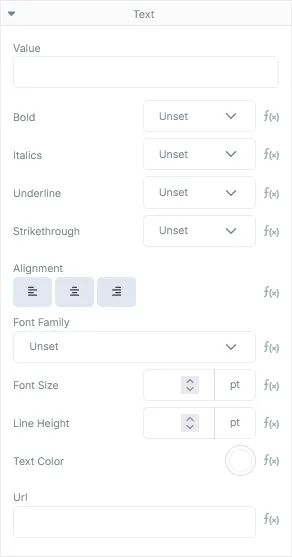
Text Element Properties
Section titled “Text Element Properties”| Field | Description |
|---|---|
| Value* | The text that should be rendered within the document. Can be a literal value or a template property. |
| Font Settings* | The settings that can be enabled or disabled for the text including: Bold, Italics, Underline and Strikethrough |
| Alignment* | The horizontal alignment of the text. Options include Left (default), Center and Right. |
| Font Family | The font family the text should be rendered in. Reverts to Roboto by default. |
| Font Size | The size of the text to render. The default value is 12 points. |
| Line Height | The total height each line of the text element should consume. The default value is 1 point. |
| Text Color | The color the text should be rendered in. Defaults to black. |
| Url* | If populated, will produce a clickable annotation within the rendered PDF document that will launch a web browser at the given URL when the associated text element is clicked. |
*The Rich Text element does not contain these base properties at this level, these properties are controlled within the text itself using the content modal.
Custom Fonts
Section titled “Custom Fonts”AstraDoc provides several system fonts for you to use out of the box. However, if you need to render documents using a specific font not provided by AstraDoc, you can upload a TTF or OTF font as an asset and the Font Family drop down should then include the custom font as an option.
Number Element
Section titled “Number Element”The Number element provides functionality to display formatted numerical data. It includes options to format the number to account for specific cultural preferences.
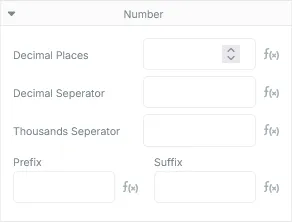
Number Properties
Section titled “Number Properties”| Field | Description |
|---|---|
| Decimal Places | The number of digits that appear after the decimal point. Defaults to 2 digits. |
| Decimal Seperator | The character used to delimit the integral value from the decimal value. Defaults to the period. |
| Thousands Seperator | The character used to seperate digit groupings for every 3 digits. Defaults to none. |
| Prefix | The string that appears before the number. Often used for currency symbols. Defaults to none. |
| Suffix | The string that appears after the number. Defaults to none. |
Date Time Element
Section titled “Date Time Element”The Date Time element provides functionality to render formatted date and time text within the document.
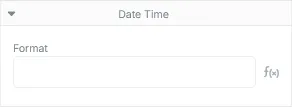
Date Time Properties
Section titled “Date Time Properties”| Field | Description |
|---|---|
| Format | A string containing a combination of tokens to describe the format the date/time value should appear as |
Common Date & Time Format Tokens
Section titled “Common Date & Time Format Tokens”| Token | Description |
|---|---|
| d | Single digit day of the month e.g. 1 |
| dd | Double digit day of the month e.g. 01 |
| ddd | The abbreviated name of the day of the week e.g. Mon, Tue |
| dddd | The full name of the day of the week e.g. Monday, Tuesday |
| M | Single digit for the month of the year e.g. 1 |
| MM | Double digit for the month of the year e.g. 01 |
| MMM | The abbreviated name for the month of the year e.g. Jan, Apr |
| MMMM | The full name for the month of the year e.g. January, April |
| yy | A 2 digit value for the year e.g. 23 |
| yyyy | A 4 digit value for the year e.g. 2023 |
| ff | Double digit for the hundredths of a second e.g .11 |
| ffff | Triple digits for the milliseconds e.g. 114 |
| s | Single digit for seconds e.g. 1 |
| ss | Double digit for seconds e.g. 01 |
| m | Single digit display for the minutes e.g. 1 |
| mm | Double digit display for the minutes e.g. 01 |
| h | Single digit display for the hours using a 12 hour clock e.g. 1 - 12 |
| hh | Double digit display for the hours using a 12 hour clock e.g. 01 -12 |
| H | Single digit display for the hours using a 24 hour clock e.g. 1 - 23 |
| HH | Double digit display for the hours using a 24 hour clock e.g. 01 - 23 |
| tt | AM/PM designator |
Rich Text Element
Section titled “Rich Text Element”The Rich Text element supports a more complex text editing environment and provides richer text rendering capabilities than the simpler Text, Number and Date Time elements. Rich text content is built using a subset of the HTML specification.
The text within a Rich Text element can also contain moustache syntax for templating and, if the supported HTML content is supplied, can have its entire content rendered dynamically through the JSON payload if required.
Text Editing
Section titled “Text Editing”Editing the text for a Rich Text element is done using the rich text editor modal:
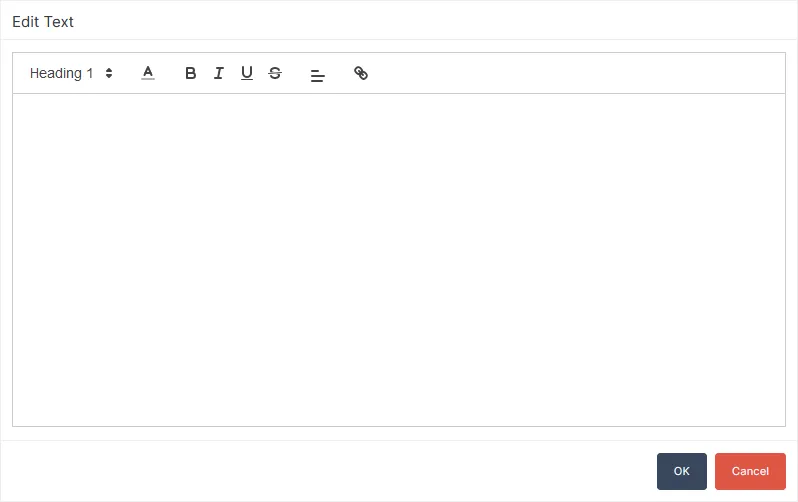
The editor modal will produce HTML content that AstraDoc will use to render the rich text. If custom rich text content will be provided, it will need to conform to the supported specifications subset.
Supported HTML Elements
Section titled “Supported HTML Elements”| Element | Application |
|---|---|
| <p> | Paragraph, used to render the text at the default size. |
| <h1> to <h6> | Headings, from the largest h1, to the smallest h6. Text size is relative to the default size. |
| <strong> | Applies a bold effect to the text. |
| <em> | Applies the italics effect to the text. |
| <u> | Applies the underline effect to the text. |
| <s> | Applies a strikethrough effect to the text. |
| <a> | An anchor element containing an href attribute that will produce a clickable annotation within the rendered PDF document that will launch a web browser at the Url contained in the href attribute when clicked. |
Supported Style Attributes
Section titled “Supported Style Attributes”| Attribute | Application |
|---|---|
| text-align | The alignment of the text within the element. Supported values are left, center, right. |
| color | The color of the text. |